5-Round Deterministic Pipeline
Executes paper ingestion, concept extraction, layout structuring, multi-platform synthesis, and QA gate verification in strictly ordered phases.
Sci-Plot is a zero-dependency prompt compiler. Feed it any skill repository plus a business topic, and it distills the rules into structured .md prompt assets — auditable, editable, and consumable on any platform without a runtime, an API key, or a paid coding agent.
Interactive Diagram CenterInstead of binding rules to a single agent runtime, Sci-Plot extracts them through a deterministic compiler with strict isolation boundaries and automated quality gates.
Executes paper ingestion, concept extraction, layout structuring, multi-platform synthesis, and QA gate verification in strictly ordered phases.
Imposes hard caps (≤10 pages / ≤15k tokens) to prevent context saturation. Isolates appendices, proofs, and references from diluting key figures.
Automatically harvests top-ranked scientific prompt styles and layout taxonomies from leading open-source repositories and cloud catalogs.
Transforms semantic scene graphs into native parameters for Midjourney v6.1, DALL-E 3, Doubao, Stable Diffusion, and executable Python Matplotlib scripts.
Adheres to Nature, Science, and IEEE typography standards with accessible color-blind safe palettes (Viridis, ColorBrewer, Tol bright).
Comprehensive test suite verifies prompt token limits, cloud downloader integrity, end-to-end simulations, and radar scanners before distribution.
Every compilation passes through 5 strictly structured rounds. The bundled reference domain targets scientific figures; the pipeline itself is domain-agnostic.
Loads source PDF, LaTeX, or Markdown. Enforces a strict ceiling of ≤10 pages and ≤15,000 tokens. Strips bibliographies, boilerplate references, and secondary appendices to prevent cognitive drift.
Identifies core hypotheses, algorithmic workflows, neural architectures, or experimental comparisons. Matches domain characteristics against the curated Rules Pool (Core + Community tracks).
Structures visual hierarchy, sub-figure arrangements (Figure 1A, 1B, 1C), visual focal points, flow directions, and color harmony matrices following Nature/Science publication criteria.
Compiles the abstract figure plan into native dialect prompts: Midjourney (parameters, lighting, camera angle), Doubao/DALL-E 3 (compositional narrative), and Matplotlib (reproducible Python code).
Validates compliance: zero hallucinated terms, correct aspect ratios, palette accessibility, text legibility, and executable renderer scripts.
Explore the live, interactive architecture generated via tt-a1i/archify. Switch between views to inspect components, execution sequence, and data flow.
docs/archify/*.html
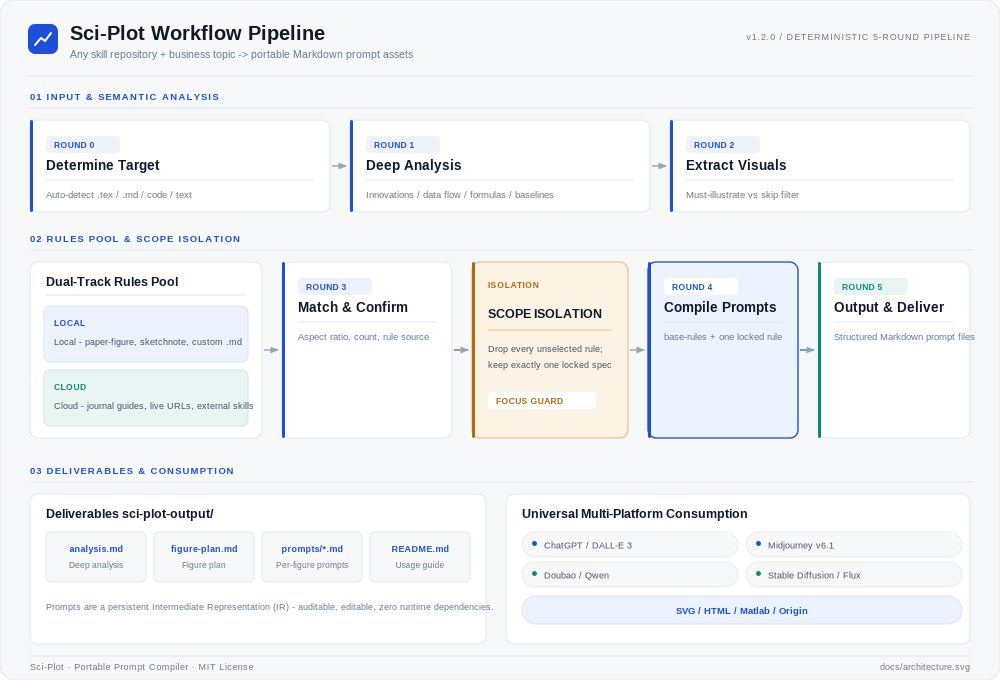
Standard vector architecture diagram linking Core Pipeline, Dual-Track Pool, Harvester, and Platform Renderers.
The built-in preset pack ships five visual grammars. Drop your own .md rules into the pool and they are discovered automatically — no hardcoded list.
Standard academic publication style. Crisp vector lines, high-contrast typography, formal layout, minimal ornamentation.
Refined minimalist aesthetic. Thin borders, generous whitespace, monochrome primary with subtle single-hue focal highlights.
Hand-drawn cognitive visual note. Ideal for conference slides, overview posters, educational tutorials, and keynote presentations.
Warm parchment aesthetic. Organic earth tones, gentle gradients, comfortable for deep reading and study guides.
Executive technology whitepaper style. Sophisticated dark/light corporate palettes, modular cards, high-density data layouts.
Drop a Markdown file into references/rules-pool/local/ and the pipeline discovers it automatically — no hardcoded list, no rebuild.
Invoke the workflow from any AI assistant — no runtime install, no subscription, no API key.
# Natural language invocation with your target paper
"Please use the sci-plot skill to parse my paper at ./paper.pdf,
generate publication-grade figures in 'paper-figure' style,
and produce prompt files for both Midjourney and Matplotlib."# Run full regression test suite
python tests/run_all_tests.py
# Ingest and update latest community scientific visualization rules
python scripts/universal_skill_harvester.py https://github.com/Yuan1z0825/nature-skillsAn organized layout separating core agent skills, ingestion scripts, interactive Archify deliverables, and verification suites.
sci-plot/
  ├── SKILL.md                  # Antigravity / Claude skill specification
  ├── docs/                     # GitHub Pages deployment root
  │   ├── index.html               # Pages entrance redirecting to overview
  │   ├── .nojekyll                # Disables Jekyll processing
  │   ├── architecture.svg         # Vector architecture chart
  │   ├── archify/                # Archify interactive diagrams (5 views)
  │   │   ├── core-architecture.html
  │   │   ├── architecture-panorama.html
  │   │   ├── workflow-panorama.html
  │   │   ├── sequence-panorama.html
  │   │   ├── dataflow-panorama.html
  │   │   └── diagram-input.md
  │   └── project_overview/       # Single source project overview page
  │       └── index.html            # Self-contained: styles + behavior inlined
  ├── references/               # Domain prompt rules and taxonomies
  │   └── core/, rules-pool/, styles/, renderers/
  ├── scripts/                  # Tooling & Harvester utilities
  │   ├── universal_skill_harvester.py
  │   ├── fetch_external_skills.py
  │   └── visualization/           # Asset generation scripts
  ├── tests/                    # 4-tier verification suite (6/6 pass)
  │   └── run_all_tests.py
└── README.md, README.zh-CN.md, pyproject.toml, LICENSEAccess complete project documentation, bilingual guides, contribution standards, and release logs.
The four questions we hear most often from agent developers and skill authors.
Generic generators invent pseudo-scientific gibberish labels and incorrect topologies. Sci-Plot extracts the real mathematical scene graph, enforces scope boundaries, and compiles tailored instructions that maintain factual fidelity.
By enforcing a 10-page / 15k token ceiling and isolating secondary appendices, Sci-Plot prevents the LLM from becoming overwhelmed by tangential proofs and ensures attention is focused entirely on the core thesis.
Yes! Sci-Plot generates executable Python Matplotlib/Seaborn scripts alongside generative AI prompts, allowing 100% offline, reproducible vector PDF/SVG rendering.
Simply go to repository Settings → Pages → Build and deployment → Source: Deploy from a branch → Branch: main, Folder: /docs. The included docs/.nojekyll and relative asset paths ensure instant, zero-configuration deployment.
One invocation takes you from a skill repository plus a topic to auditable Markdown prompt assets — ready for any LLM, any image tool, or a fully offline renderer.